Three environments, three AWS accounts: isolation with Terragrunt
Why dev, staging and prod belong in separate AWS accounts, and how to wire Terragrunt so each environment uses its own state, role and guardrails.
In an earlier post we used Terragrunt to stop copy-pasting Terraform between environments. This post goes one step further: putting dev, staging and prod in separate AWS accounts, and making Terragrunt enforce that separation for you.
Why separate accounts?
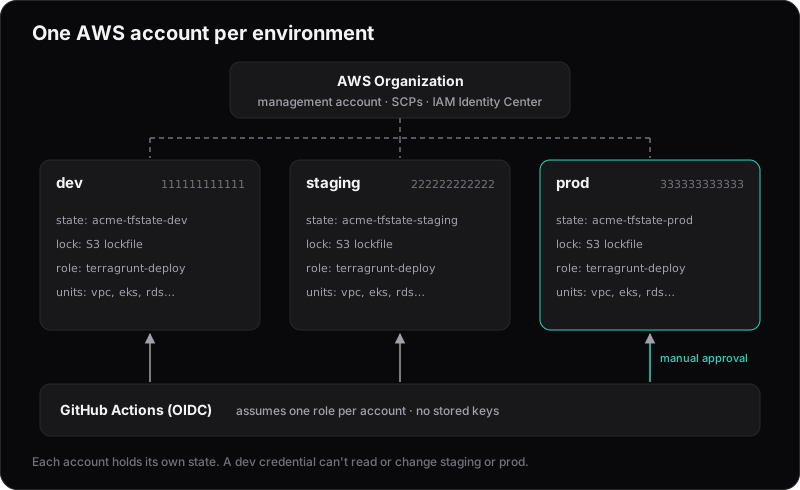
An AWS account is the strongest isolation boundary AWS offers. Separate VPCs or tags inside one account all share the same IAM, quotas and billing. Separate accounts don't:
- Blast radius. A mistake or a leaked credential in dev can't touch prod.
- Permissions stay simple. Developers can have broad access in dev without complex conditions to keep them out of prod.
- Quotas don't compete. A load test in staging can't use up prod's service limits.
- Costs split automatically. Each environment's spend is visible without perfect tagging.
The layout
live/
  root.hcl
  dev/
    account.hcl
    eu-west-1/
      vpc/terragrunt.hcl
      eks/terragrunt.hcl
  staging/
    account.hcl
    eu-west-1/...
  prod/
    account.hcl
    eu-west-1/...
Each account folder has a small account.hcl:
# live/prod/account.hcl
locals {
  account_name = "prod"
  account_id   = "333333333333"
}
One root file, three isolated setups
The root file reads the nearest account.hcl and builds everything account-specific from it:
# live/root.hcl
locals {
  account = read_terragrunt_config(find_in_parent_folders("account.hcl")).locals
}

# Terragrunt assumes this role before running Terraform.
iam_role = "arn:aws:iam::${local.account.account_id}:role/terragrunt-deploy"

remote_state {
  backend = "s3"
  generate = {
    path      = "backend.tf"
    if_exists = "overwrite_terragrunt"
  }
  config = {
    bucket       = "acme-tfstate-${local.account.account_name}"
    key          = "${path_relative_to_include()}/terraform.tfstate"
    region       = "eu-west-1"
    encrypt      = true
    use_lockfile = true
  }
}

generate "provider" {
  path      = "provider.tf"
  if_exists = "overwrite_terragrunt"
  contents  = <<EOF
provider "aws" {
  region              = "eu-west-1"
  allowed_account_ids = ["${local.account.account_id}"]
}
EOF
}
Three details do most of the isolation work:
- A state bucket per account. Prod's state lives in the prod account. Someone with dev access can't read it, and it may contain secrets.
- A role per account. Terragrunt assumes
terragrunt-deployin the target account, so nobody needs long-lived credentials for each one. allowed_account_ids. If credentials ever point at the wrong account, Terraform refuses to run instead of happily creating prod resources in dev.
Bootstrapping each account
Each account needs two things before Terragrunt can deploy anything there.
- The
terragrunt-deployrole. Terragrunt assumes this role before doing anything else, including creating the state bucket, so it has to exist first. Create it with a small bootstrap Terraform config, run once per account with admin credentials. - The state bucket. Since Terragrunt v0.87.0 (September 2025), Terragrunt no longer creates missing backend resources during a normal run. Running
planagainst an account that has no bucket yet fails with an error instead of creating one. You have to ask for it explicitly:
cd live/prod/eu-west-1/vpc
terragrunt backend bootstrap
Every unit in an account shares the same bucket, so running this in one unit per account is enough. Terragrunt creates the bucket with versioning and encryption turned on, so a bad apply can be rolled back to an earlier state file. You can also pass --backend-bootstrap, or set TG_BACKEND_BOOTSTRAP=true, on the first run.
Don't set TG_BACKEND_BOOTSTRAP permanently in CI. With bootstrapping off, a typo in a bucket name fails the pipeline. With it on, Terragrunt creates a new, empty state bucket, and the next plan wants to recreate everything.
Deploying from CI
CI signs in with OIDC and assumes a different role per account, as described in our post on deploying from GitHub Actions without long-lived keys. Terragrunt still assumes iam_role on top of whatever credentials CI has, so either let the CI role assume terragrunt-deploy, or set iam_web_identity_token so Terragrunt assumes terragrunt-deploy directly with the GitHub token.
Two rules keep prod safe:
- The prod role's trust policy only accepts tokens whose subject is
repo:acme/infra:environment:production, and theproductionenvironment only allows deployments frommain. When a job uses an environment, the token's subject names the environment instead of the branch, so the branch rule has to live on the environment. - The
productionenvironment requires a reviewer to approve before the apply job runs.
Update (October 2026): Repositories created after 15 July 2026 use a subject that includes owner and repository IDs (repo:acme@123/infra@456:...). See our OIDC post for the new format.
To plan a whole environment:
cd live/staging
terragrunt run --all plan
Promoting changes between environments
With separate accounts, you want a change to move dev → staging → prod in that order. Pin module versions per environment:
# live/staging/eu-west-1/vpc/terragrunt.hcl
terraform {
  source = "git::git@github.com:acme/infra-modules.git//vpc?ref=v1.4.0"
}
Release a new module version, bump the ref in dev, then staging, then prod, each as its own pull request. Each environment's folder shows exactly which version it runs.
When it's overkill
For a single developer with one environment, separate accounts add setup you don't need yet. Once you have real customers in prod and more than one person with AWS access, the isolation is worth the extra hour of setup. Moving to separate accounts later is much harder than starting with them.