Terragrunt: keeping multi-environment Terraform DRY
How Terragrunt removes copy-pasted backend and provider config across environments and AWS accounts, with a practical folder layout and examples.
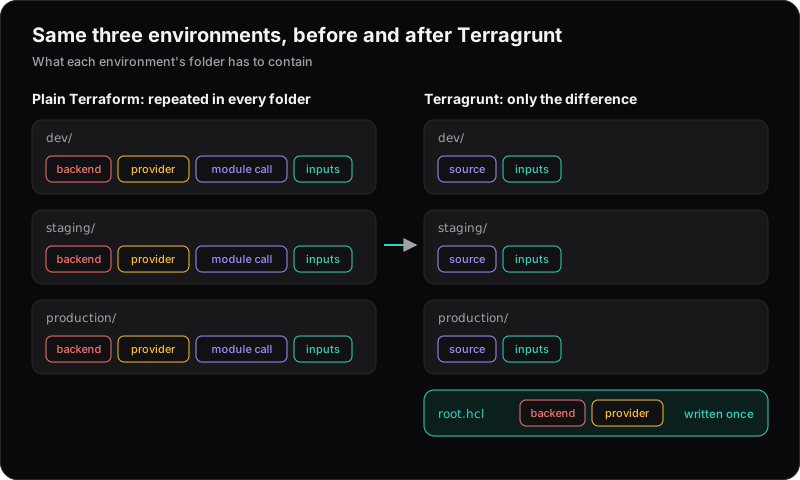
Terraform is great until you have several environments built from the same pieces. Then the same backend block, provider config and module call get copy-pasted into every folder, and the copies slowly drift apart.
Terragrunt is a thin wrapper around Terraform (and OpenTofu) that fixes this. You write your modules once, and each environment becomes a small file that says which module, with which inputs.
The problem with plain Terraform
The two common approaches both have trade-offs:
- Workspaces keep environments in one directory, but it's easy to apply to the wrong one, and differences between environments are hidden in variables.
- A folder per environment is explicit, but every folder repeats the same backend, provider and module boilerplate.
Terragrunt keeps the folder-per-environment clarity and removes the repetition.
A typical layout
modules/
  vpc/
  ecs-service/
live/
  root.hcl
  dev/
    env.hcl
    vpc/terragrunt.hcl
    api/terragrunt.hcl
  staging/
    env.hcl
    vpc/terragrunt.hcl
    api/terragrunt.hcl
  production/
    env.hcl
    vpc/terragrunt.hcl
    api/terragrunt.hcl
modules/ holds normal Terraform modules. live/ describes what is deployed where.
Backend and provider config, written once
The root file generates the backend and provider for every module underneath it:
# live/root.hcl
remote_state {
  backend = "s3"
  generate = {
    path      = "backend.tf"
    if_exists = "overwrite_terragrunt"
  }
  config = {
    bucket       = "acme-terraform-state"
    key          = "${path_relative_to_include()}/terraform.tfstate"
    region       = "eu-west-1"
    encrypt      = true
    use_lockfile = true
  }
}

generate "provider" {
  path      = "provider.tf"
  if_exists = "overwrite_terragrunt"
  contents  = <<EOF
provider "aws" {
  region = "eu-west-1"
}
EOF
}
Every module gets its own state file automatically, keyed by its folder path, so production/vpc can never overwrite staging/vpc. use_lockfile turns on native S3 state locking, so you don't need a DynamoDB table. It needs Terraform 1.10+ or OpenTofu 1.10+.
Update (October 2026): Since Terragrunt v0.87.0 (5 September 2025), the state bucket is no longer created automatically. Create it once with terragrunt backend bootstrap. For one AWS account per environment, see our later post.
Each environment is a small diff
# live/production/vpc/terragrunt.hcl
include "root" {
  path = find_in_parent_folders("root.hcl")
}

terraform {
  source = "../../../modules//vpc"
}

inputs = {
  cidr_block = "10.20.0.0/16"
  az_count   = 3
}
The dev and staging files are identical except for their inputs. Reviewing the difference between environments means comparing two short files.
Values shared across an environment — region, account ID, instance sizes — can live in env.hcl and be loaded with read_terragrunt_config(find_in_parent_folders("env.hcl")), so they're defined once.
Dependencies between modules
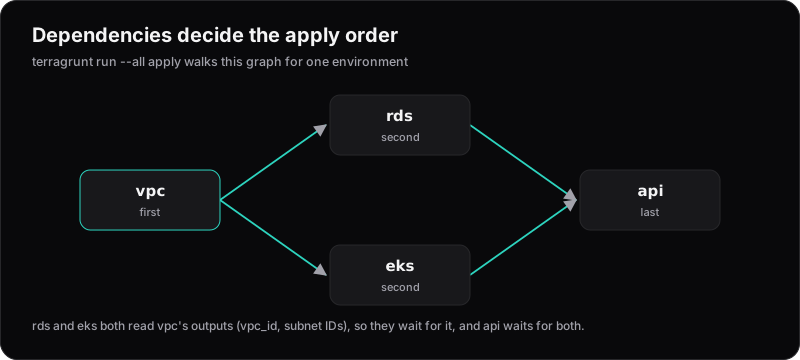
Modules often need each other's outputs. Instead of hard-coding IDs, declare a dependency:
# live/production/api/terragrunt.hcl
dependency "vpc" {
  config_path = "../vpc"
}

inputs = {
  vpc_id     = dependency.vpc.outputs.vpc_id
  subnet_ids = dependency.vpc.outputs.private_subnet_ids
}
Terragrunt now knows the API depends on the VPC, and applies them in the right order.
Running many modules at once
Terragrunt can plan or apply a whole tree of modules in dependency order with terragrunt run --all. That's handy for standing up a new environment from scratch. To plan an environment that doesn't exist yet, give each dependency block mock_outputs, so units can be planned before the modules they depend on are applied. For production changes, we still prefer targeting individual modules from CI, with the plan reviewed before apply.
When is it worth it?
Terragrunt pays off when you have multiple environments or AWS accounts built from the same pieces. For a single environment and a small team, plain Terraform is simpler and perfectly fine.
One note if you're reading older tutorials: recent Terragrunt versions recommend naming the root file root.hcl rather than a root-level terragrunt.hcl, and some commands have been renamed. Check the docs for the version you're installing.