Deploying to AWS from GitHub Actions without long-lived keys
Replace stored AWS access keys with short-lived OIDC credentials, and set up a test-then-deploy pipeline with approvals and safe concurrency.
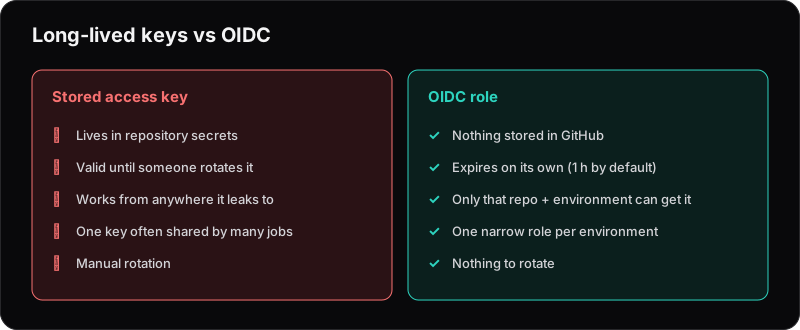
Plenty of CI/CD pipelines still deploy to AWS with an access key stored as a repository secret. It works — until that key leaks through a log, a fork or a compromised dependency, and someone has permanent access to your account.
GitHub Actions supports OpenID Connect (OIDC), which lets a workflow get short-lived AWS credentials on demand. No keys stored anywhere, and nothing to rotate.
How it works
When a workflow runs, GitHub can issue a signed token describing the job: which repository, which branch, which environment. AWS checks that token against an identity provider you've set up, and if it matches the conditions on an IAM role, hands back temporary credentials that expire automatically.
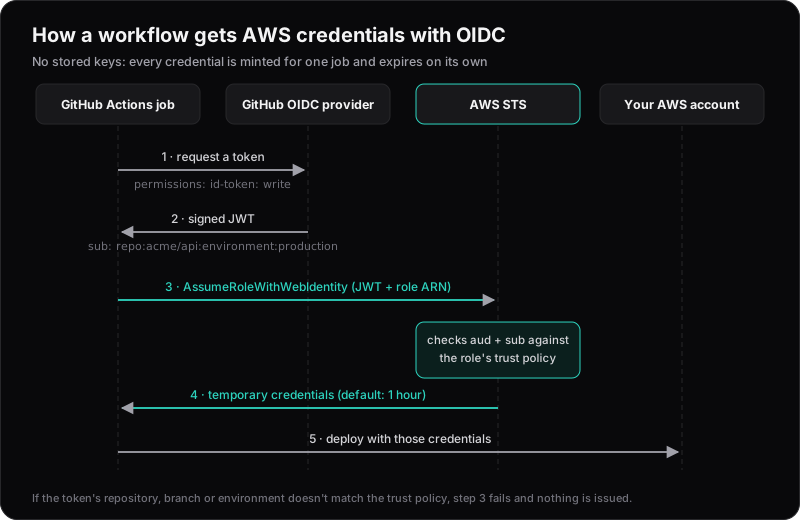
By default the credentials last one hour. If a deploy takes longer, raise role-duration-seconds on the credentials step, and the role's maximum session duration with it.
The AWS side
You need two things, ideally both defined in Terraform:
- An IAM OIDC identity provider for
token.actions.githubusercontent.com, with audiencests.amazonaws.com. - An IAM role whose trust policy only allows the exact repository and environment you intend:
{
  "Effect": "Allow",
  "Principal": {
    "Federated": "arn:aws:iam::123456789012:oidc-provider/token.actions.githubusercontent.com"
  },
  "Action": "sts:AssumeRoleWithWebIdentity",
  "Condition": {
    "StringEquals": {
      "token.actions.githubusercontent.com:aud": "sts.amazonaws.com",
      "token.actions.githubusercontent.com:sub": "repo:acme/api:environment:production"
    }
  }
}
The sub condition is what matters. IAM won't accept a GitHub role without one, but a loose pattern such as repo:* would still let any repository on GitHub assume the role. Use separate roles for staging and production, each with only the permissions its deploy needs.
The sub value depends on what triggered the job, so match the pattern to how you deploy:
| Job runs for | sub looks like |
|---|---|
| A GitHub environment | repo:acme/api:environment:production |
| A branch push | repo:acme/api:ref:refs/heads/main |
| A tag | repo:acme/api:ref:refs/tags/v1.2.0 |
| A pull request | repo:acme/api:pull_request |
Update (October 2026): Repositories created, renamed or transferred after 15 July 2026 use an immutable sub format that includes owner and repository IDs, for example repo:acme@123456/api@456789:environment:production. Older repositories keep the format above unless they opt in. Check which one yours uses before writing the trust policy.
If a job uses an environment, the environment wins and the branch isn't in sub. Protect the environment's deployment branches in GitHub instead.
The workflow
name: Deploy

on:
  push:
    branches: [main]

permissions:
  id-token: write
  contents: read

concurrency:
  group: deploy-production
  cancel-in-progress: false

jobs:
  test:
    runs-on: ubuntu-latest
    steps:
      - uses: actions/checkout@v4
      - run: npm ci
      - run: npm test

  deploy:
    needs: test
    runs-on: ubuntu-latest
    environment: production
    steps:
      - uses: actions/checkout@v4
      - uses: aws-actions/configure-aws-credentials@v4
        with:
          role-to-assume: arn:aws:iam::123456789012:role/github-deploy-production
          aws-region: eu-west-1
      - run: ./scripts/deploy.sh
Update (October 2026): The @v4 versions of both actions run on Node 20, which GitHub removed from its runners in September 2026. Use the current majors, actions/checkout@v7 and aws-actions/configure-aws-credentials@v6, or pin them to commit SHAs.
A few details worth calling out:
id-token: writelets the job request an OIDC token. Without it, the credentials step fails.environment: productionputsenvironment:productioninto the token, which the trust policy checks. It also enables GitHub's environment protection rules.concurrencystops deploys from running on top of each other. Only the newest waiting run is kept, and older waiting runs are cancelled, which is usually what you want for deploys.cancel-in-progress: falsemeans a deploy that has started is never cut off halfway.needs: testmeans nothing ships unless the tests pass.
Update (October 2026): GitHub now supports queue: max in a concurrency block, which keeps up to 100 waiting runs instead of only the newest.
Hardening checklist
- Add required reviewers to the production environment in GitHub, so deploys wait for approval. For private repositories this needs GitHub Enterprise.
- Restrict which branches can deploy to that environment.
- Pin third-party actions to a full commit SHA rather than a tag.
- Keep each deploy role narrow — a role that only updates one ECS service is much less dangerous than one with admin rights.
- Use CloudTrail to see when and from which repository and environment each role was assumed. Set
role-session-name(for example to the run ID) to trace individual runs.
Using GitLab?
GitLab CI supports the same approach with id_tokens. The AWS side — identity provider plus a tightly scoped role — is almost identical.