Checkov and Infracost: catching security and cost problems before Terraform applies
Two checks on every infrastructure pull request: Checkov for security and best practices, Infracost for what the change will cost. Real output, CI setup, and how to keep both useful.
Code review catches a lot, but reviewers rarely spot that an S3 bucket has no public access block, or that a "small" change adds $70 a month. Both problems are cheap to fix in a pull request and expensive once they're in production.
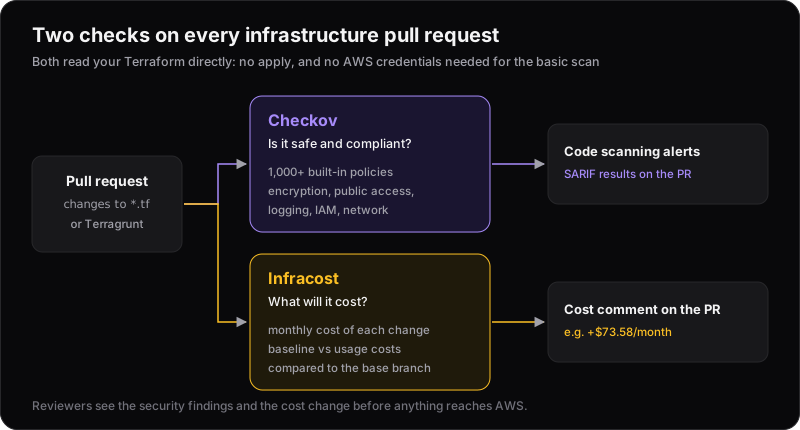
Two tools close that gap by reading your Terraform directly, before anything is applied:
- Checkov checks it against security and best-practice policies.
- Infracost works out what it will cost each month.
Checkov: static analysis for infrastructure
Checkov is open source (Apache 2.0) and maintained by Prisma Cloud. It ships with over 1,000 built-in policies and covers far more than Terraform: CloudFormation, Kubernetes, Helm, Dockerfiles, GitHub Actions and more.
Running it
pip install checkov
checkov -d infra/ --framework terraform --compact --quiet
--compacthides the code snippets.--quietshows only failed checks.- Neither changes the exit code: Checkov still exits with an error when checks fail. Use
--soft-failif you only want a report.
We ran it on a small, deliberately careless sample: an S3 bucket, a security group open to SSH, a public unencrypted RDS instance and an EC2 instance. These four resources produced 25 failed checks (and 17 passes):
terraform scan results:

Passed checks: 17, Failed checks: 25, Skipped checks: 0

Check: CKV_AWS_24: "Ensure no security groups allow ingress from 0.0.0.0:0 to port 22"
	FAILED for resource: aws_security_group.ssh
	File: /main.tf:9-20
Check: CKV_AWS_16: "Ensure all data stored in the RDS is securely encrypted at rest"
	FAILED for resource: aws_db_instance.db
	File: /main.tf:22-32
Check: CKV_AWS_79: "Ensure Instance Metadata Service Version 1 is not enabled"
	FAILED for resource: aws_instance.web
	File: /main.tf:34-37
...
Output trimmed. Checkov 3.x; counts vary between versions.
Some of those are serious: SSH open to the internet, a public database, an unencrypted database, and IMDSv1 left enabled on the instance. Others are good practice you may decide you don't need yet, such as Multi-AZ, cross-region replication or enhanced monitoring. Part of adopting Checkov is deciding which is which.
Fixing and skipping
Four small changes cleared the most important findings:
resource "aws_s3_bucket_public_access_block" "data" {
  bucket                  = aws_s3_bucket.data.id
  block_public_acls       = true
  block_public_policy     = true
  ignore_public_acls      = true
  restrict_public_buckets = true
}

resource "aws_instance" "web" {
  # ...
  metadata_options {
    http_endpoint = "enabled"
    http_tokens   = "required" # IMDSv2 only
  }
}
…plus storage_encrypted = true on the database and an SSH rule limited to the VPN range.
When a finding doesn't apply, skip it in the code, with a reason, rather than turning the check off everywhere:
resource "aws_s3_bucket" "data" {
  #checkov:skip=CKV_AWS_18:Access logs are shipped centrally via CloudTrail data events
  bucket = "checkov-demo-data-bucket"
}
Checkov reports it as skipped, with your reason, so the decision is visible in every scan and every review:
Check: CKV_AWS_18: "Ensure the S3 bucket has access logging enabled"
	SKIPPED for resource: aws_s3_bucket.data
	Suppress comment: Access logs are shipped centrally via CloudTrail data events
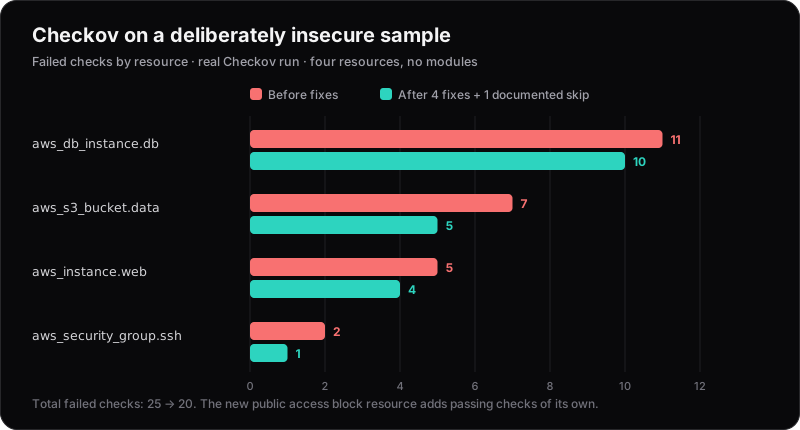
The database still has 10 findings. One is that it's still publicly_accessible, which is exactly the kind of thing the remaining list should make you look at; most of the rest are hardening options such as Multi-AZ, deletion protection and enhanced monitoring.
Adopting it on an existing codebase
Running Checkov on a mature repo for the first time can produce hundreds of findings. Don't try to fix them all before turning it on:
- Baseline what exists today.
checkov -d . --create-baselinerecords current findings. Future runs with--baseline .checkov.baselineonly fail on new problems. - Keep shared settings in
.checkov.yamlin the repo root (skipped checks, frameworks, output format), so local runs and CI behave the same. - Scan the plan, not just the code, when variables or modules decide what gets created.
terraform show -json tfplan.binary > tfplan.jsonthencheckov -f tfplan.json --repo-root-for-plan-enrichment ., so findings point at your.tflines and your inline skips still apply. Use--download-external-modules trueif you scan code that uses registry modules. - Write your own policies for house rules, such as required tags or allowed instance families. Checkov supports simple YAML policies as well as Python checks loaded with
--external-checks-dir. - Run it before commit too. There's an official pre-commit hook (
checkov).
Infracost: what will this change cost?
Infracost reads Terraform (and Terragrunt or CloudFormation) and prices every resource against cloud provider price lists. It doesn't need a plan file or cloud credentials. It parses the HCL directly.
Infracost's CLI was recently rewritten as Infracost 2.0. If you find older guides using infracost breakdown and infracost diff, those are the legacy v0.10 commands. The current CLI looks like this:
infracost auth login           # free account; CI uses a token instead
infracost scan ./terraform     # price every resource and apply policies
infracost inspect --top 10     # the most expensive resources from the last scan
ADDRESS                              TYPE                  MONTHLY_COST
aws_instance.web_app                 aws_instance              $560.64
aws_db_instance.primary              aws_db_instance           $124.00
aws_eks_cluster.platform             aws_eks_cluster            $73.00
Example output from the Infracost documentation.
The real value shows up on pull requests. Instead of a total, reviewers see what this change does to the bill:
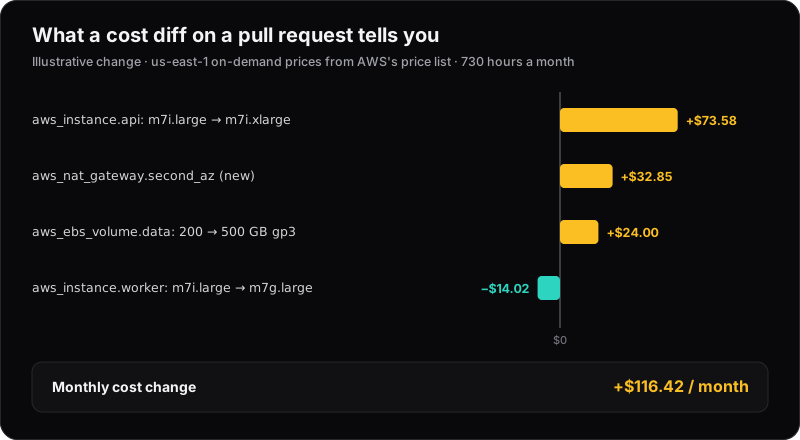
Illustrative change, priced with AWS's us-east-1 on-demand rates.
None of those lines is surprising on its own. What helps is seeing them together, in the review, before merging. The NAT Gateway line is a good example: it's easy to add one per availability zone without noticing it's a fixed monthly cost, plus a charge per GB processed.
Usage-based costs need a little help
Infracost splits costs into two kinds:
- Baseline costs come from what you provision, such as instance size or volume size. Infracost assumes resources run for the whole month (730 hours).
- Usage costs depend on traffic: NAT Gateway data, S3 requests, Lambda invocations, log ingestion. Infracost can't know these from your code, and marks them with
*.
Without usage figures, Infracost can't know how much data a NAT Gateway processes, so its data charges are understated or missing. Give Infracost realistic numbers in an infracost-usage.yml file in the repo:
version: 0.1
resource_usage:
  aws_nat_gateway.second_az:
    monthly_data_processed_gb: 500
  aws_lambda_function.thumbnailer:
    monthly_requests: 2000000
    request_duration_ms: 300
Reference it from infracost.yml with usage_file: infracost-usage.yml. Rough numbers taken from last month's bill are far better than none.
Wiring both into CI
With GitHub Actions, both tools fit into one workflow on pull requests that touch infrastructure:
name: Infrastructure checks

on:
  pull_request:
    paths: ["infra/**"]

permissions:
  contents: read
  pull-requests: write
  security-events: write
  actions: read

jobs:
  checkov:
    runs-on: ubuntu-latest
    steps:
      - uses: actions/checkout@v4
      - uses: bridgecrewio/checkov-action@v12
        with:
          directory: infra
          framework: terraform
          output_format: cli,sarif
          output_file_path: console,results.sarif
      - uses: github/codeql-action/upload-sarif@v4
        if: success() || failure()
        with:
          sarif_file: results.sarif

  infracost:
    runs-on: ubuntu-latest
    steps:
      - uses: actions/checkout@v4
        with:
          path: head
      - uses: actions/checkout@v4
        with:
          ref: ${{ github.event.pull_request.base.ref }}
          path: base
      - uses: infracost/actions/diff@v4
        with:
          api-key: ${{ secrets.INFRACOST_API_KEY }}
          base-path: base
          head-path: head
- Checkov's SARIF output shows up as code scanning alerts on the exact lines that triggered them. Code scanning is free on public repos; private repos need GitHub Code Security (and the
actions: readpermission above). The upload step runs even when Checkov fails, so you see why. - Infracost compares the base branch with the PR and posts a comment with the cost change. The secret holds an Infracost service account or personal access token (keys from the old CLI don't work with 2.0).
- Pin action versions to a commit SHA in production workflows, as with any third-party action.
Infracost also offers a GitHub App, which it recommends over the Action and which needs no workflow at all.
Making it stick
Both tools fail the same way when they're added carelessly: too much noise, and people learn to ignore them.
- Block on a short list, report the rest. Make the build fail for the findings you'd never accept (public data, open admin ports, no encryption). Report the rest with
--soft-failuntil you've worked through them. Note that severity-based thresholds (--hard-fail-on HIGH) need a Prisma Cloud API key; without one, list check IDs instead. - Every skip needs a reason. A
#checkov:skipwith a sentence is a decision. A disabled check is a blind spot. - Treat cost as information, not a gate, at least at first. A cost comment that says "+$116/month" starts the right conversation. Blocking merges on cost needs agreed budgets, which is where Infracost's paid guardrails come in.
- Know what's free. Checkov is fully open source. Infracost's CI integration is free for up to 1,000 runs a month; FinOps policies, guardrails and dashboards are part of its paid plans.
Neither tool replaces review or a well-designed platform. They make sure two easy-to-miss questions, is this safe? and what will it cost?, get asked on every change. Pair them with the habits in cutting your AWS bill and deploying with short-lived credentials, and most surprises get caught in the pull request.