How to cut your AWS bill without re-architecting anything
Eight practical checks that reduce AWS spend in days, not months — from orphaned volumes and NAT Gateway traffic to log retention and Savings Plans.
Most AWS bills don't grow because of one bad decision. They grow quietly: a test instance nobody turned off, a log group that keeps everything forever, a NAT Gateway moving traffic it doesn't need to. The good news is that a lot of that waste can be removed without rewriting anything.
Here are the checks we start with, roughly in order of effort.
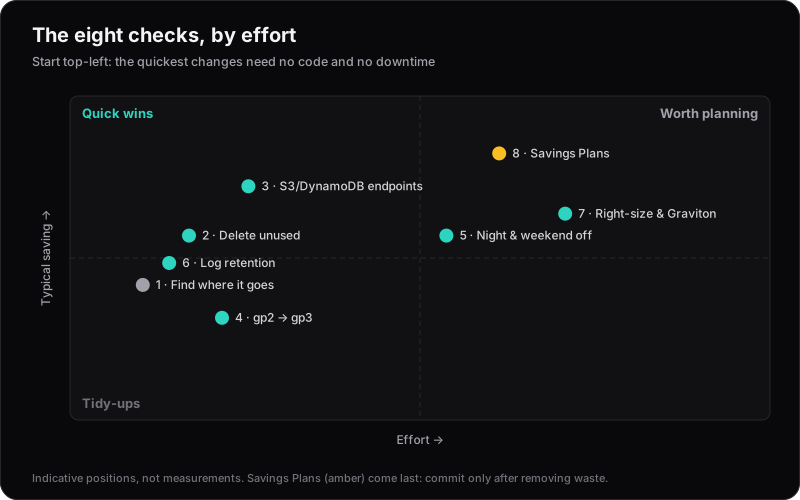
| Check | Effort | Downtime | Needs code changes |
|---|---|---|---|
| 1. Find where the money goes | Hours | No | No |
| 2. Delete unused resources | Hours | No | No |
| 3. Gateway endpoints for S3 and DynamoDB | Hours | No | No |
| 4. gp2 to gp3 | Hours | No | No |
| 5. Turn off non-production at night | A day | Non-prod only | Rarely |
| 6. Log retention | Hours | No | No |
| 7. Right-size, then Graviton | Days to weeks | Usually brief | Sometimes |
| 8. Savings Plans | Hours, but a 1- or 3-year commitment | No | No |
1. Find out where the money actually goes
Before changing anything, open Cost Explorer and group costs by service over the last three months. Then drill into the top few services and group by usage type. The usual suspects are EC2, RDS, NAT Gateway, data transfer and CloudWatch.
If you can't tell which environment or team a cost belongs to, turn on cost allocation tags (for example environment and project) and start tagging. You can't manage what you can't attribute.
2. Delete what nobody is using
Orphaned resources are the easiest savings there are:
- Unattached EBS volumes — in the EC2 console, filter volumes by state
available. - Old snapshots and AMIs that no longer back anything you run.
- Idle load balancers with no healthy targets.
- Unused public IPv4 addresses — AWS bills $0.005 an hour (about $3.65 a month) for every public IPv4 address, attached or not.
3. Stop paying NAT Gateway to talk to S3
NAT Gateways charge per hour and per gigabyte processed: in us-east-1, $0.045 for each. If workloads in private subnets read from or write to S3 or DynamoDB, that traffic goes through the NAT Gateway by default.
Gateway VPC endpoints for S3 and DynamoDB have no hourly or data charge, and route that traffic privately for buckets and tables in the same Region. For heavy S3 users, this one change can be significant:
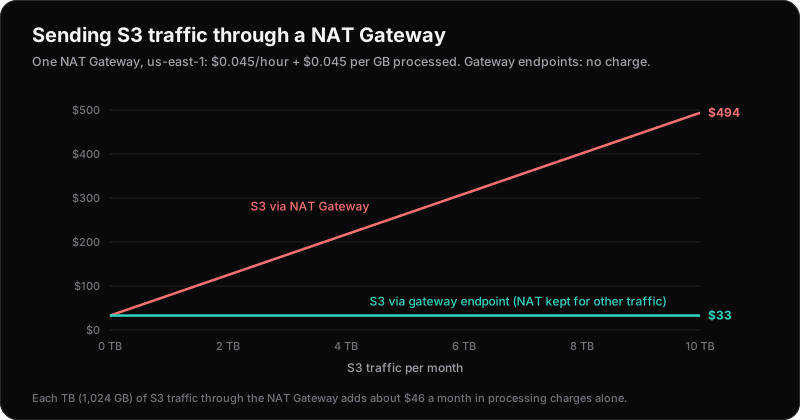
Every terabyte of S3 traffic you move off the NAT Gateway saves about $46 a month. Adding the endpoint is a route-table change, with no application changes:
resource "aws_vpc_endpoint" "s3" {
  vpc_id            = aws_vpc.main.id
  service_name      = "com.amazonaws.${var.region}.s3"
  vpc_endpoint_type = "Gateway"
  route_table_ids   = aws_route_table.private[*].id
}
4. Move EBS volumes from gp2 to gp3
gp3 costs $0.08 per GB-month in us-east-1, against $0.10 for gp2: 20% cheaper. Every gp3 volume also gets 3,000 IOPS and 125 MB/s included, whatever its size, whereas gp2 only gets faster as it gets bigger.
| Volume | gp2 per month | gp3 per month | Saving |
|---|---|---|---|
| 100 GB | $10 | $8 | $2 |
| 500 GB | $50 | $40 | $10 |
| 2 TB | $200 | $160 | $40 |
The migration can be done in place, without downtime. One catch: larger gp2 volumes can outperform gp3's baseline. Over 1 TB they have more than 3,000 IOPS, and over 170 GiB they can reach 250 MB/s. Provision extra IOPS and throughput on gp3 to match. It's usually still cheaper.
5. Turn off non-production outside working hours
Development and staging environments rarely need to run at 3am on a Sunday. A week has 168 hours; working hours (say 12 hours a day, five days a week) are only 60 of them. Running non-production only then cuts its compute hours by about 64%. Instance Scheduler on AWS, or a couple of EventBridge rules, will do it.
6. Set log retention
CloudWatch log groups keep data forever by default. You pay to ingest logs once ($0.50 per GB), but you pay to store them every month ($0.03 per GB, measured after compression), so the storage bill keeps growing:
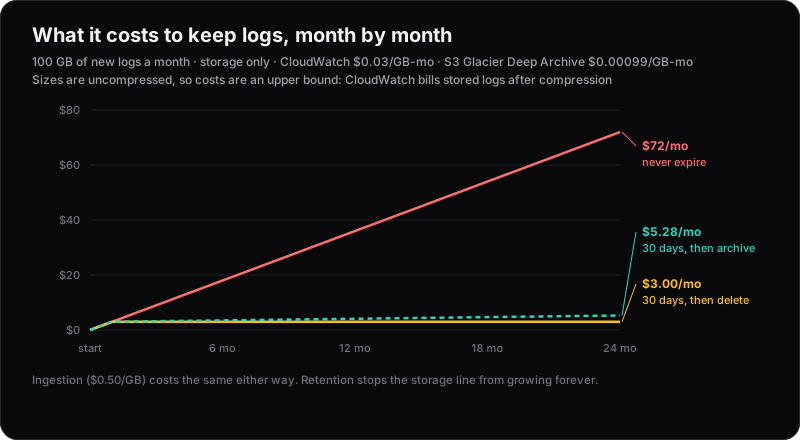
Set a retention period that matches how you actually use logs — often 14 to 90 days — and export anything you must keep long-term to S3. S3 Glacier Deep Archive stores a GB for $0.00099 a month, about 30 times cheaper than CloudWatch.
7. Right-size, then consider Graviton
AWS Compute Optimizer flags over-provisioned EC2 instances, Auto Scaling groups, Lambda functions and EBS volumes. Look at real CPU and memory usage before accepting its recommendations.
While you're there, test Graviton (ARM) instance types. Most Linux workloads run on them unchanged, and they cost about 20% less per hour than the equivalent Intel instance. See moving from x86 to Graviton for the numbers and a migration path.
8. Commit last, not first
Savings Plans and Reserved Instances can cut compute costs substantially — but only commit once the steps above are done and usage is stable. Otherwise you lock in a discount on waste.
Keeping it down
A one-off clean-up drifts back without guardrails. Set up AWS Budgets alerts and Cost Anomaly Detection, and enforce tagging in your Terraform so every new resource is attributable from day one.