Autoscaling Bitbucket Pipelines runners on EKS with Terraform
Run Bitbucket Pipelines on your own EKS cluster with x86 and Arm runners that scale with demand. Deploy Atlassian's runner autoscaler with one Terraform module, tune it, and let pipelines reach AWS with OIDC instead of keys.
Bitbucket's hosted runners are convenient, but build minutes add up, and they can't reach anything private in your VPC. Self-hosted runners fix both. The catch is that a plain self-hosted runner is a single, always-on process: too few and builds queue, too many and you pay for idle machines.
Atlassian's runners autoscaler solves that on Kubernetes. It watches your runners and creates or removes them as demand changes. Labyrinth Labs wraps it in a Terraform module, so on EKS it's one module block.
Since module v1.1.0 (February 2026), it can also run amd64 and arm64 runners side by side. Builds that run on Arm can use cheaper Graviton nodes, and you can build native images for both architectures.
How it works
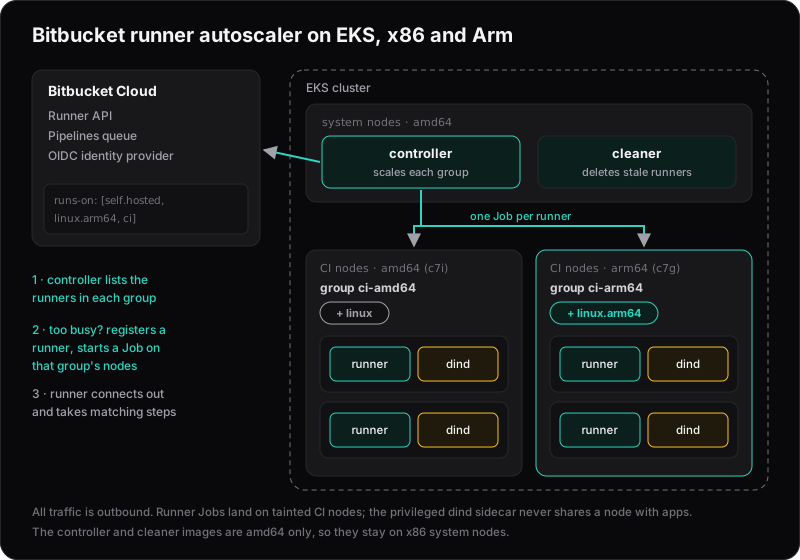
- The controller checks your runners in Bitbucket on a schedule (every 10 minutes by default). For each runner group (here, one for amd64 and one for arm64), it compares how many online runners are busy with how many are idle.
- When it scales up, it registers a new runner with Bitbucket, then starts a Kubernetes Job for it. Each Job runs the runner plus a Docker-in-Docker sidecar, so pipeline steps can run containers.
- When it scales down, it disables idle runners, and the cleaner later deletes them and their Jobs.
All connections go out from the cluster to Bitbucket, so your nodes can stay in private subnets with no inbound access.
Before you start
You need:
- An EKS cluster with a node autoscaler (Cluster Autoscaler or Karpenter), so new runner pods get nodes.
- Your workspace UUID: the
uuidfield returned byhttps://api.bitbucket.org/2.0/workspaces/<your-workspace>when you're logged in. - An Atlassian API token with the scopes
read:repository:bitbucket,read:workspace:bitbucket,read:runner:bitbucketandwrite:runner:bitbucket. Use a dedicated account if you can. Don't start with an app password: Atlassian stopped issuing them in September 2025 and existing ones stop working in June 2026.
Update (October 2026): App passwords stopped working on 9 June 2026.
Give runners their own nodes
The Docker sidecar runs privileged. That's how Docker-in-Docker works, but it means a build step has a lot of access to the node it runs on. Keep runners away from your applications with a dedicated, tainted node group:
# In your EKS managed node group definition (terraform-aws-modules/eks)
labels = { workload = "ci" }

taints = {
  ci = {
    key    = "workload"
    value  = "ci"
    effect = "NO_SCHEDULE"
  }
}
Create two CI node groups with the same label and taint: one with x86 instances (for example c7i) and one with Graviton instances (for example c7g). EKS labels every node with kubernetes.io/arch, so the autoscaler can tell them apart. With Karpenter, one NodePool that allows both architectures works too.
The autoscaler's own controller and cleaner images are amd64 only. They're small, so pin them to x86 nodes and keep them off the CI nodes.
Deploy the autoscaler
Module v1.1.0 still uses Helm provider 2.x syntax, so pin the provider below 3.0:
terraform {
  required_providers {
    helm = {
      source  = "hashicorp/helm"
      version = "~> 2.17"
    }
  }
}
Update (October 2026): Module v2.0.0 and later (currently v2.0.1) support Helm provider 3 and AWS provider v6, with the same inputs, so you can drop the pin and use ?ref=v2.0.1.
locals {
  workspace_uuid = "11111111-2222-3333-4444-555555555555"

  # Settings shared by both runner groups
  runner_group = {
    workspace = "{${local.workspace_uuid}}" # braces required here
    labels    = ["ci"]
    namespace = "bitbucket-runners" # must differ from the controller's namespace
    strategy  = "percentageRunnersIdle"
    parameters = {
      min                   = 1
      max                   = 10
      scale_up_threshold    = 0.7
      scale_down_threshold  = 0.5
      scale_up_multiplier   = 1.5
      scale_down_multiplier = 0.5
    }
    resources = {
      requests = { cpu = "1000m", memory = "2Gi" }
      limits   = { cpu = "1000m", memory = "2Gi" }
    }
  }
}

module "bitbucket_runner_autoscaler" {
  source = "git::https://github.com/lablabs/terraform-aws-eks-bitbucket-runner-autoscaler.git?ref=v1.1.0"

  enabled                  = true
  bitbucket_workspace_name = "acme"
  bitbucket_workspace_uuid = local.workspace_uuid # no braces here

  # Hidden from plan output (still stored in state, so protect your state)
  helm_set_sensitive = {
    "credentialsSecret.atlassianAccountEmail" = var.atlassian_account_email
    "credentialsSecret.atlassianApiToken"     = var.atlassian_api_token
  }

  values = yamlencode({
    # The autoscaler's own images are amd64 only
    controller = { nodeSelector = { "kubernetes.io/arch" = "amd64" } }
    cleaner    = { nodeSelector = { "kubernetes.io/arch" = "amd64" } }

    runner = {
      # Applies to every runner pod, in both groups
      tolerations = [{ key = "workload", value = "ci", effect = "NoSchedule" }]

      config = {
        constants = {
          runner_api_polling_interval = 300 # seconds; don't go below 120
          runner_cool_down_period     = 300
        }
        groups = [
          merge(local.runner_group, {
            name          = "ci-amd64"
            architecture  = "amd64"
            node_selector = { workload = "ci", "kubernetes.io/arch" = "amd64" }
          }),
          merge(local.runner_group, {
            name          = "ci-arm64"
            architecture  = "arm64"
            node_selector = { workload = "ci", "kubernetes.io/arch" = "arm64" }
          }),
        ]
      }
    }
  })
}
The module installs the Helm chart into the bitbucket-runner-autoscaler namespace. The chart creates the runner namespace, a service account for runners, and a cluster role that lets the controller create Jobs and Secrets.
A few details trip people up:
architectureandnode_selectordo different jobs.architecturedecides which platform label the runner registers with in Bitbucket.node_selectordecides which nodes its pod runs on. Set both, or an arm64 runner can land on an x86 node and fail to start.- Both groups can share the label
ci. Each group's label set must be unique, but the autoscaler addslinuxfor amd64 andlinux.arm64for arm64, so the sets differ. - The workspace UUID appears twice, once without braces (for the module's OIDC setup) and once with braces (inside the runner groups).
- Pin the module version.
?ref=v1.1.0keeps a future release from changing your CI setup without you noticing. Releases before v1.1.0 used a singlerunner.nodeSelectorand supported amd64 only.
Tune the scaling
Each group scales on one number: the share of its online runners that are busy.
- Above
scale_up_threshold: it grows the group toceil(online × scale_up_multiplier), up tomax. - Below
scale_down_threshold: it shrinks the idle runners tofloor(idle × scale_down_multiplier), but never belowmin. Runners younger thanrunner_cool_down_periodare left alone. - Anywhere in between: nothing changes.
The defaults are cautious. A group only shrinks when fewer than 20% of its runners are busy, so after a busy morning it often sits at max for the rest of the day. We simulated a working day using the autoscaler's own logic:
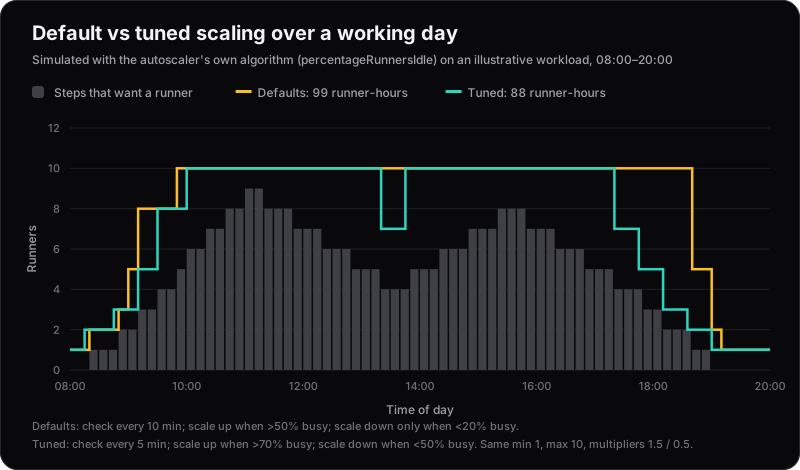
Illustrative workload. Both settings kept every step supplied with a runner. The tuned settings used about 11% fewer runner-hours.
The tuned values in the module block above (check every 5 minutes, scale up above 70% busy, scale down below 50%) let the group shrink sooner after peaks. A few more rules of thumb:
- Keep
minat 1 or more. A step that asks for a runner when none are online fails instead of waiting. - Don't poll faster than every 2 minutes. Pending pods never show as online in Bitbucket, so an over-eager controller keeps creating Jobs while nodes are still starting.
- Size
resourcesso several runners fit on a node. Atlassian suggests 2 GiB and one CPU covers most builds. The limits apply to the runner container only. The Docker sidecar has none, so leave room on the node for the builds themselves.
Point pipelines at your runners
A step runs on a runner that has all the labels it asks for. The autoscaler adds self.hosted plus the platform label (linux or linux.arm64) alongside your group's labels, so the platform label is how a step picks its architecture:
pipelines:
  default:
    - parallel:
        - step:
            name: Test (x86)
            runs-on: [self.hosted, linux, ci]
            script:
              - make test
        - step:
            name: Test (Arm)
            runs-on: [self.hosted, linux.arm64, ci]
            script:
              - make test
Without linux.arm64, Bitbucket treats a step as x86, even if an Arm runner is idle. On Arm runners, every image the step uses (the step image, service containers and pipes) needs an arm64 version. If you use atlassian/default-image, Arm needs version 4 or later.
Building images for both architectures. Run one build per architecture, each on its own native runner (no slow emulation), push them with architecture tags, then join them into one multi-arch tag:
docker buildx imagetools create -t $IMAGE:$TAG $IMAGE:$TAG-amd64 $IMAGE:$TAG-arm64
Steps without runs-on keep using Bitbucket's hosted runners, so you can move pipelines over one at a time.
Let pipelines reach AWS without keys
The module can also create an IAM OIDC provider for your Bitbucket workspace and a role that pipelines assume with short-lived tokens. It's the same idea as deploying from GitHub Actions without long-lived keys.
By default, the role trusts every pipeline in the workspace. Narrow it to specific repositories. The token's subject has the format {REPOSITORY_UUID}:{STEP_UUID}, or {REPOSITORY_UUID}:{ENVIRONMENT_UUID}:{STEP_UUID} for deployment steps:
module "bitbucket_runner_autoscaler" {
  # ...everything above...

  oidc_role_name      = "pipelines"
  oidc_policy_enabled = true
  oidc_policy         = data.aws_iam_policy_document.pipelines.json

  # Only this repository may assume the role
  oidc_assume_role_policy_condition_values = [
    "{aaaaaaaa-bbbb-cccc-dddd-eeeeeeeeeeee}:*",
  ]
}

output "pipelines_role_arn" {
  value = module.bitbucket_runner_autoscaler.addon_oidc["bitbucket-runner-autoscaler"].iam_role_attributes.arn
}
In the pipeline, turn on OIDC for the step and hand the token to the AWS CLI:
- step:
    name: Push image
    image: amazon/aws-cli
    runs-on: [self.hosted, linux, ci]
    oidc: true
    services:
      - docker
    script:
      - export AWS_REGION=eu-west-1
      - export AWS_ROLE_ARN=arn:aws:iam::123456789012:role/bitbucket-runner-autoscaler-oidc-pipelines
      - export AWS_WEB_IDENTITY_TOKEN_FILE=$(pwd)/web-identity-token
      - echo $BITBUCKET_STEP_OIDC_TOKEN > $(pwd)/web-identity-token
      - aws ecr get-login-password | docker login --username AWS --password-stdin 123456789012.dkr.ecr.eu-west-1.amazonaws.com
AWS can only check the token's sub and aud claims, not the branch name. To limit production access to deployments, create a separate role whose condition includes your production deployment environment's UUID.
Things to watch
- Docker Hub rate limits. Every new runner starts with an empty Docker cache, so busy days can hit anonymous pull limits. Set
runner.dind.registryMirrorsto a mirror, or use images from ECR. - The controller runs without resource requests. This chart version has no setting for them, so schedule it on a stable node group rather than on spot capacity.
- Limits per autoscaler. One autoscaler config can have at most 10 runner groups, and each group needs its own distinct set of labels (including the platform label).
- Each architecture scales on its own, and each keeps at least
minrunners online. Don't setmin = 0to save money on the group you use less: the autoscaler only scales up from busy runners, so with none online it never starts one, and every step that targets that group fails. - It's community-supported. Atlassian publishes the autoscaler but doesn't cover it with Atlassian Support. Watch its changelog when you upgrade the module.
Is it worth it?
If your team uses only a few hundred build minutes a month, Bitbucket's hosted runners are simpler. Self-hosted, autoscaled runners pay off when builds are frequent or heavy, when steps need to reach private resources in your VPC, or when you want CI to use the same nodes, caches and IAM controls as the rest of your AWS setup.