Moving from x86 to Graviton: what it saves and how to switch safely
Graviton instances cost about 20% less per hour than the matching Intel generation, including burstable t4g versus t3. Here's what that means for your bill, where the performance claims come from, and a low-risk migration path.
AWS Graviton instances run on Arm processors that AWS designs itself. For most modern workloads they're a drop-in replacement for Intel and AMD instances, and they cost less per hour. The real question is whether your software runs on Arm, not whether switching saves money.
What it saves
On-demand prices in us-east-1 put each Graviton generation about 19–20% below the matching Intel generation, consistently across the general purpose (M), compute (C) and memory (R) families.
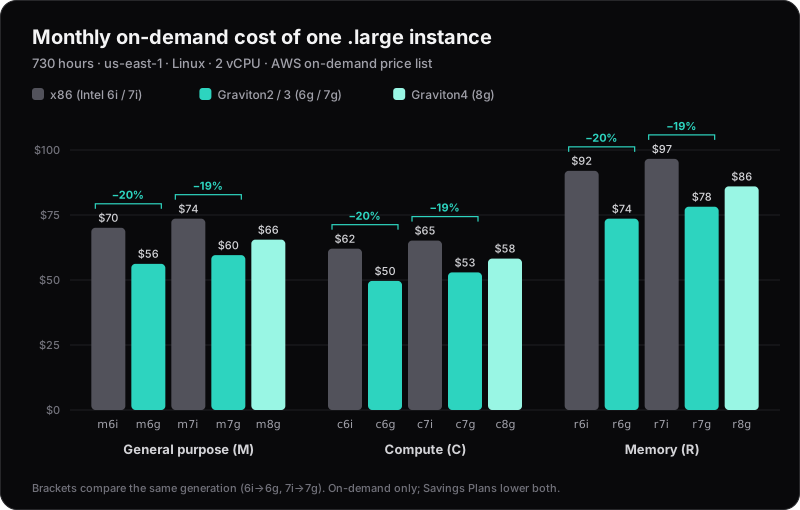
Monthly cost of one .large instance (2 vCPU), us-east-1, Linux, on-demand. Source: AWS on-demand price list.
| Instance | $/hour | Per month | vs Intel, same generation |
|---|---|---|---|
| m7i.large | $0.1008 | $73.58 | — |
| m7g.large | $0.0816 | $59.57 | −19% |
| c7i.large | $0.08925 | $65.15 | — |
| c7g.large | $0.0725 | $52.93 | −19% |
| r7i.large | $0.1323 | $96.58 | — |
| r7g.large | $0.1071 | $78.18 | −19% |
For a fleet of ten m7i.large, moving to m7g.large saves about $140 a month, or $1,680 a year, before any Savings Plans. AWS's own headline is that Graviton instances "cost up to 20% less than comparable x86-based Amazon EC2 instances", which matches the price list.
Graviton4 (m8g, c8g, r8g) costs more per hour than Graviton3 but is still cheaper than 7th-generation Intel.
Update (October 2026): Intel's 8th generation (m8i, c8i, r8i) and Graviton5 (m9g) have launched since this was written. Between m8i and m8g the gap is about 15%. The newer Intel burstable t8i costs more than t4g: t8i.micro is $0.01248 an hour against $0.0084.
Burstable instances: t3 and t3a to t4g
For small teams, the biggest share of the fleet is often burstable T instances: dev environments, bastion hosts, small APIs and background workers. The Graviton equivalent is t4g, and it's cheaper than both Intel (t3) and AMD (t3a) at every size.
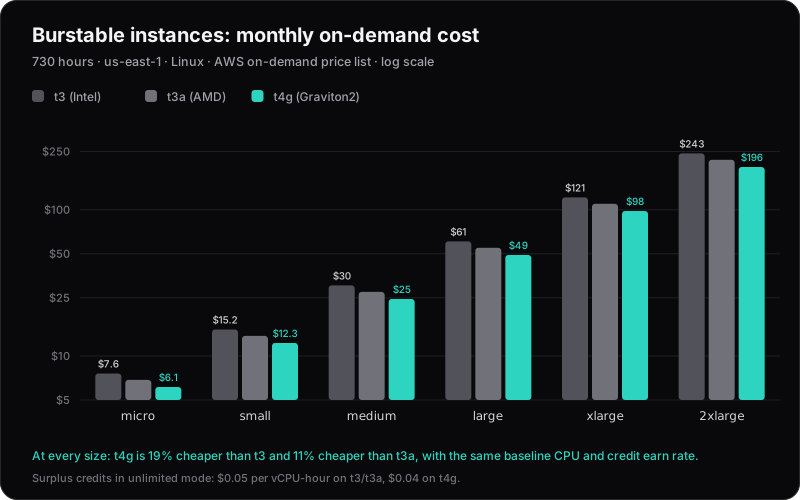
Monthly cost, us-east-1, Linux, on-demand, 730 hours. Source: AWS on-demand price list.
| Size | vCPU / GiB | t3 | t3a | t4g | t4g vs t3 |
|---|---|---|---|---|---|
| micro | 2 / 1 | $7.59 | $6.86 | $6.13 | −19% |
| small | 2 / 2 | $15.18 | $13.72 | $12.26 | −19% |
| medium | 2 / 4 | $30.37 | $27.45 | $24.53 | −19% |
| large | 2 / 8 | $60.74 | $54.90 | $49.06 | −19% |
| xlarge | 4 / 16 | $121.47 | $109.79 | $98.11 | −19% |
| 2xlarge | 8 / 32 | $242.94 | $219.58 | $196.22 | −19% |
A few things are different about burstable instances:
- The burst rules are the same. At each size, t3, t3a and t4g have the same baseline (10% of each vCPU for
micro, 20% forsmallandmedium, 30% forlarge) and earn CPU credits at the same rate. Switching doesn't change when you burst. - Bursting past your credits costs less on t4g. T3, T3a and T4g default to unlimited mode: when credits run out, they keep running at full speed and you pay for the extra. That's $0.05 per vCPU-hour on t3 and t3a, and $0.04 on t4g.
- A vCPU is more than a thread. On t3 and t3a, each vCPU is one thread of a shared core. On t4g, AWS doesn't split cores into threads, so a credit spent there often gets more work done.
- There's a free trial. AWS has been offering
t4g.smallinstances free for up to 750 hours a month as a trial, on top of the normal Free Tier. Check the current end date on the T4g page before relying on it.
If a T instance runs flat out most of the time, it's in the wrong family. Run it on m7g or c7g instead, where you get the full CPU without paying for surplus credits.
What about performance?
Be careful with headline numbers. AWS's published claims are each made against a specific baseline:
- Graviton2: M6g delivers "up to 40% better price performance over M5", the older Intel generation.
- Graviton3: M7g delivers "up to 25% better performance over Graviton2-based M6g".
- Graviton4: "up to 30% better compute performance than Graviton3".
- Energy: Graviton uses "up to 60% less energy than comparable EC2 instances for the same performance".
One detail matters when you compare. On Intel instances, each vCPU is a hyperthread, so 2 vCPUs share one physical core. On Graviton, each vCPU is a full core. CPU-bound services often do more work per vCPU on Graviton, so you may be able to run fewer or smaller instances. That's a bonus on top of the price difference, but only your own benchmark will tell you how big it is.
Will your software run on Arm?
Usually, yes:
- Interpreted and JIT languages (Node.js, Python, Java, .NET, Ruby, PHP) run unchanged.
- Go cross-compiles with
GOARCH=arm64(cgo code also needs a C cross-compiler). Rust needs the aarch64 target added and a suitable linker. - Python packages with native code need arm64 wheels. Popular packages publish them; older or niche ones may compile from source or fail.
The problems are usually around the code rather than in it: container images built only for amd64, old base images, and third-party agents or sidecars that don't ship an arm64 build.
A low-risk migration path
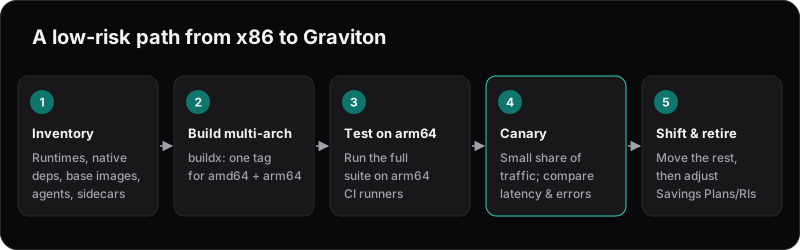
1. Inventory. List every service, its runtime, its base image, and every agent that runs beside it (monitoring, security, log shippers).
2. Build multi-arch images. One tag, two architectures:
docker buildx build \
  --platform linux/amd64,linux/arm64 \
  -t 123456789012.dkr.ecr.eu-west-1.amazonaws.com/api:1.8.0 \
  --push .
Emulated builds work but can be slow for compiled code. Native arm64 CI runners are much faster, and GitHub offers hosted ones.
3. Test on arm64. Run your full test suite on an arm64 runner, not only the build.
4. Canary. Send a small share of traffic to Graviton and compare p95 latency, error rate and CPU at equal load. On Kubernetes, allow both architectures and let pods land on either:
# Karpenter NodePool requirement
- key: kubernetes.io/arch
  operator: In
  values: ["arm64", "amd64"]
On ECS Fargate, set runtimePlatform.cpuArchitecture to ARM64 in a new task definition revision.
5. Shift and retire. Move the remaining capacity, then check your commitments. Compute Savings Plans apply to Graviton automatically. EC2 Instance Savings Plans and Standard Reserved Instances are tied to an instance family, so moving off m6i early can strand them. Convertible RIs can be exchanged. Time the switch with their expiry.
The easy wins first
Some of the quickest savings need no code changes at all. RDS, ElastiCache and OpenSearch all offer Graviton instance classes, so the switch is a configuration change during a maintenance window. Lambda functions can run on arm64 too. Start there, then move on to your own containers.