RAG that actually works: building an assistant over your documents
Why most retrieval-augmented generation demos disappoint in production, and the chunking, retrieval and evaluation practices that fix them.
Retrieval-augmented generation (RAG) lets a language model answer questions using your documents — help-centre articles, internal wikis, contracts, support tickets — without training a custom model. Before answering, the system finds the most relevant passages and gives them to the model as context.
A basic demo takes an afternoon. Getting reliable answers for real users takes more care. Here's what makes the difference.
The three stages
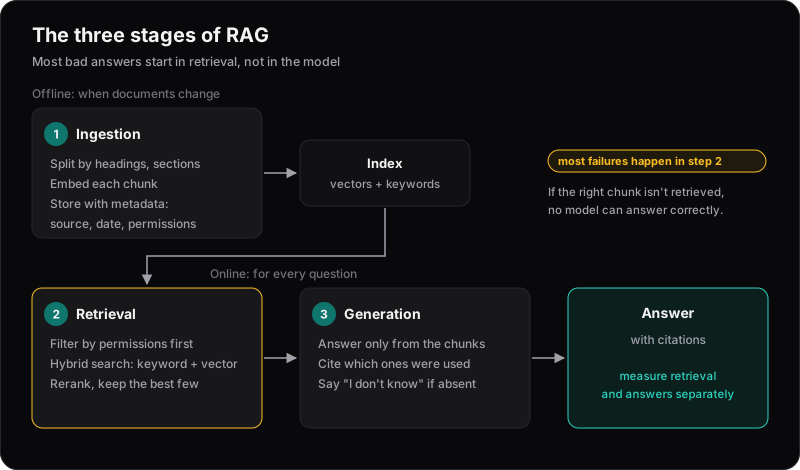
- Ingestion — split documents into chunks, create embeddings, and store them with metadata.
- Retrieval — for each question, find the most relevant chunks.
- Generation — ask the model to answer using only those chunks, and cite them.
Most failures happen at retrieval. If the right passage never reaches the model, even the best model can only guess — and it will guess confidently.
Chunk by structure, not by character count
Splitting every 1,000 characters cuts sentences, tables and sections in half. Instead:
- Split along the document's own structure: headings, sections, list items.
- Keep chunks big enough to make sense on their own, with a little overlap.
- Store metadata with every chunk: source document, title, section, date, and who's allowed to see it.
Adding the document and section title to each chunk's text also helps, because a paragraph often doesn't mention what it's about.
Don't rely on vector search alone
Embeddings are good at meaning, but can miss exact terms — product codes, error messages, names. Two changes make a large difference:
- Hybrid search: combine keyword search with vector search, so exact matches aren't lost.
- Reranking: retrieve more candidates than you need, then use a reranking model to pick the best few.
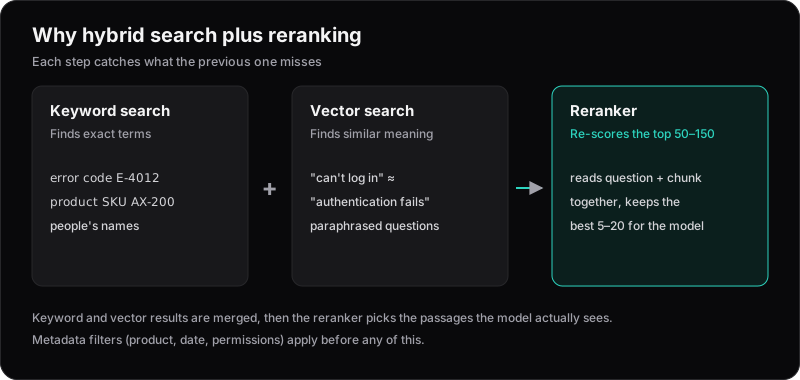
Use metadata filters too, for example to restrict answers to one product or to current documents only.
Enforce permissions at retrieval time
If some documents are restricted, filter them out before they reach the model. Telling the model "don't reveal confidential information" in a prompt is not a security boundary — if the text is in the context, assume it can come out.
Make it cite its sources
Instruct the model to answer only from the provided context, to cite which chunks it used, and to say clearly when the answer isn't there. Citations let users verify answers, and "I don't know" is far better than a plausible invention.
Evaluate before you tune
Build a test set of 50–100 real questions with the expected answer or source document. Then measure two things separately:
- Retrieval: does the correct chunk appear in the top results?
- Answers: is the response correct, grounded in the sources, and properly cited?
Rerun this every time you change chunking, embeddings, prompts or models. Without it, you're tuning by feel.
Measuring the two separately tells you where to look:
| Retrieval | Answers | What it means | Fix |
|---|---|---|---|
| Good | Good | Working | Keep the test set growing |
| Good | Bad | The model ignores or misreads the chunks | Prompt, model, or chunk formatting |
| Bad | Bad | The right passage never arrives | Chunking, hybrid search, reranking, filters |
| Bad | Good | Lucky, or answering from its own knowledge | Check citations; tighten "answer only from context" |
Where to store embeddings on AWS
- pgvector on Amazon RDS or Aurora PostgreSQL — a great default if you already use Postgres; your vectors live next to your data.
- Amazon OpenSearch Service — strong when you need heavy hybrid search and filtering.
- Amazon Bedrock Knowledge Bases — a managed pipeline that handles ingestion and retrieval for you, with less control over the details.
Update (October 2026): Amazon S3 Vectors (generally available since December 2025) adds low-cost vector storage that works with Bedrock Knowledge Bases and OpenSearch. Bedrock Knowledge Bases now also offers a fully managed option with agentic retrieval.
The database matters less than people expect. Chunking, retrieval quality and evaluation are what make users trust the answers.