Managing a private EKS cluster with AWS Client VPN
Take your Kubernetes API server off the internet and give engineers access through AWS Client VPN with single sign-on. Architecture, Terraform, multi-Region costs, and how it compares with a Session Manager bastion host.
By default, an EKS cluster's API server has a public endpoint. Requests still need valid IAM credentials, but the endpoint itself is reachable from anywhere on the internet. You can restrict it to a list of IP ranges, but that breaks down quickly for a remote team whose home IPs keep changing.
A cleaner setup is to turn the public endpoint off and let engineers reach the cluster through AWS Client VPN, signing in with the same identity they use for the AWS console.
How it fits together
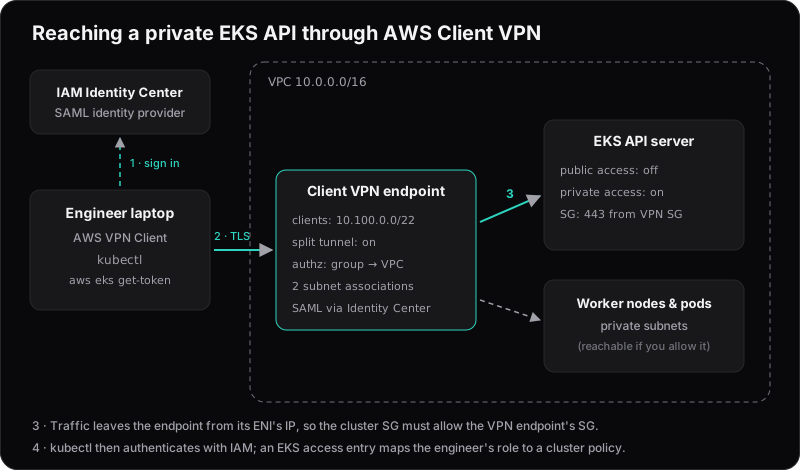
- The engineer connects with the AWS VPN Client and signs in through IAM Identity Center (SAML).
- The Client VPN endpoint checks an authorization rule: only members of the platform group may reach the VPC's address range.
- Traffic leaves the endpoint with the IP address of its network interface in your subnet. That means the cluster's security group must allow port 443 from the Client VPN endpoint's security group, not from the laptop's IP.
kubectlauthenticates to the cluster with IAM as usual, and an EKS access entry decides what that engineer can do.
The cluster: private endpoint only
resource "aws_eks_cluster" "this" {
  # ...
  vpc_config {
    subnet_ids              = var.private_subnet_ids
    endpoint_private_access = true
    endpoint_public_access  = false
  }

  access_config {
    authentication_mode = "API"
  }
}
With public access off, the cluster's endpoint name still resolves through public DNS, but to private IP addresses in your VPC. Once connected to the VPN, kubectl works without any extra DNS setup.
The VPN endpoint
resource "aws_ec2_client_vpn_endpoint" "this" {
  description                   = "engineering"
  server_certificate_arn        = aws_acm_certificate.vpn.arn
  client_cidr_block             = "10.100.0.0/22"
  split_tunnel                  = true
  vpc_id                        = var.vpc_id
  security_group_ids            = [aws_security_group.vpn.id]
  dns_servers                   = ["10.0.0.2"] # VPC resolver: VPC CIDR base + 2
  session_timeout_hours         = 8
  disconnect_on_session_timeout = true

  authentication_options {
    type              = "federated-authentication"
    saml_provider_arn = aws_iam_saml_provider.identity_center.arn
  }

  connection_log_options {
    enabled              = true
    cloudwatch_log_group = aws_cloudwatch_log_group.vpn.name
  }
}

resource "aws_ec2_client_vpn_network_association" "this" {
  for_each               = toset(slice(var.private_subnet_ids, 0, 2)) # subnets in two different AZs; 1 is fine for dev
  client_vpn_endpoint_id = aws_ec2_client_vpn_endpoint.this.id
  subnet_id              = each.value
}

resource "aws_ec2_client_vpn_authorization_rule" "platform" {
  client_vpn_endpoint_id = aws_ec2_client_vpn_endpoint.this.id
  target_network_cidr    = "10.0.0.0/16"
  access_group_id        = var.platform_group_id # group ID from Identity Center
}
A few choices worth explaining:
- Split tunnel sends only VPC traffic through the VPN. Video calls and web browsing stay on the engineer's normal connection, which keeps the VPN fast and cheap.
dns_serverspoints at the VPC resolver, so private names such as internal load balancers and private hosted zones resolve too. You don't need it for EKS itself.- Connection logs show who connected, when and from where, which you'll want for audits.
- The group rule means removing someone from the platform group in Identity Center also removes their VPN access. The
memberOfattribute in the SAML app is case-sensitive.
Who can do what in the cluster
Being on the VPN only gets you to the API server. Permissions inside the cluster come from access entries, which replace the deprecated aws-auth ConfigMap:
resource "aws_eks_access_entry" "platform" {
  cluster_name  = aws_eks_cluster.this.name
  principal_arn = var.platform_admin_role_arn # role from the Identity Center permission set
}

resource "aws_eks_access_policy_association" "platform" {
  cluster_name  = aws_eks_cluster.this.name
  principal_arn = var.platform_admin_role_arn
  policy_arn    = "arn:aws:eks::aws:cluster-access-policy/AmazonEKSClusterAdminPolicy"

  access_scope {
    type = "cluster"
  }
}
Give developers AmazonEKSViewPolicy, or scope them to their own namespaces with type = "namespace".
What it costs
You pay per hour for each subnet association and per hour for each active connection. Using the example rates on AWS's pricing page (US East, Ohio), each subnet association costs $0.10 an hour, about $73 a month, whether or not anyone is connected. Each connection costs $0.05 an hour, so an engineer connected for a normal working day adds about $9 a month.
Do you need two subnet associations?
No. One association is enough. It gives connected engineers a route to the whole VPC, including other Availability Zones and peered VPCs. You can associate at most one subnet per Availability Zone, so a second association only buys redundancy: if the zone holding your only association has an outage, nobody can connect until you associate a subnet in another zone.
- Dev, staging or a small team: use one association, at about $73 a month. If a zone ever fails, you can associate a subnet in another zone, but plan for some downtime.
- Production, where the VPN is the only way in: a zone outage is exactly when you need to reach the cluster. Either pay for a second association, or keep a cheap fallback in another zone, such as the Session Manager bastion host described below.
The chart below assumes two associations, about $146 a month, so it shows the highly available setup.
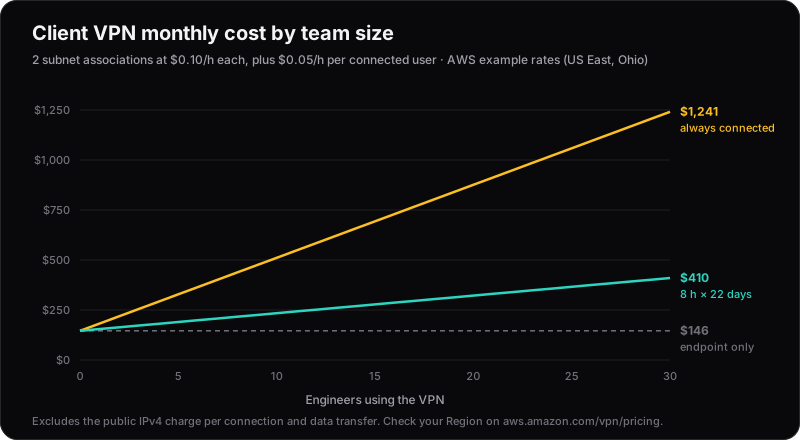
Example rates from the AWS VPN pricing page. Rates vary by Region, and each connection also carries a public IPv4 charge.
Beyond the number of associations, the biggest cost variable is how long people stay connected. The 8-hour session timeout, with disconnect_on_session_timeout, keeps forgotten connections from running all weekend. Without it, the client reconnects automatically when the session ends.
Gotchas
- The client range can't change.
client_cidr_blockmust be /22 or larger, can't overlap the VPC, and can't be changed after creation. Pick it carefully. - Authorization rules and security groups are separate. You need both: the rule lets the user into the network, and the security group lets the traffic reach the target.
- Changing the endpoint's route table disconnects everyone. Make route changes outside working hours.
- IPv4 only. Client VPN doesn't carry IPv6, so on dual-stack networks IPv6 traffic bypasses the tunnel.
Update (October 2026): Since August 2025, Client VPN can carry IPv6 traffic, but without source NAT, so allow the client range in your security groups.
More than one Region? Peer the VPCs
A VPC belongs to one Region, so it's tempting to assume you need a Client VPN endpoint in every Region you run a cluster in. With two subnet associations at $146 a month each before anyone connects, three Regions would cost $438 a month in endpoint fees alone.
You don't need that. Put one endpoint in a hub VPC and peer the other VPCs to it. AWS documents this as a supported Client VPN scenario: add a route and an authorization rule for each peered VPC's CIDR, and allow the traffic in that VPC's security groups.
VPC peering has no hourly charge, but it isn't completely free. You pay for the data that crosses it:
- Same Region, different Availability Zone: $0.01/GB in each direction.
- Different Regions: standard inter-Region data transfer rates, for example $0.02/GB between US East and US West.
kubectl traffic is small. Even a heavy user rarely moves more than a few hundred megabytes a month, so this usually costs cents.
Peering does have limits to plan around:
- CIDRs can't overlap. Plan VPC ranges across Regions up front.
- Security groups can't be referenced across Regions. In a remote cluster's security group, allow port 443 from the hub VPC's CIDR (or the endpoint's subnets) instead of the VPN security group.
- Peering isn't transitive. Every spoke peers with the hub directly. Beyond a handful of VPCs, a Transit Gateway is easier to manage. It costs about $36 a month per VPC attachment plus data processing, so it's only worth it at that scale.
DNS needs no extra work. The private EKS endpoint name resolves through public DNS to private IP addresses, so it resolves the same way from any peered VPC.
The cheaper alternative: a bastion host with Session Manager
The usual alternative to a VPN is a bastion host, also called a jump host or jump box: a small EC2 instance inside the VPC that you go through to reach private resources. The traditional version exposes SSH to the internet. The modern version uses AWS Systems Manager Session Manager and has no inbound ports, no SSH keys and no public IP. The SSM Agent on the instance makes outbound connections to Systems Manager, and engineers connect through the AWS API with their normal IAM Identity Center credentials.
Session Manager has no extra charge for EC2 instances, so you only pay for the instance. A t4g.nano with an 8 GB gp3 volume costs about $4 a month, however many engineers use it. The same peering pattern applies, so one bastion in the hub VPC can reach clusters in every peered Region.
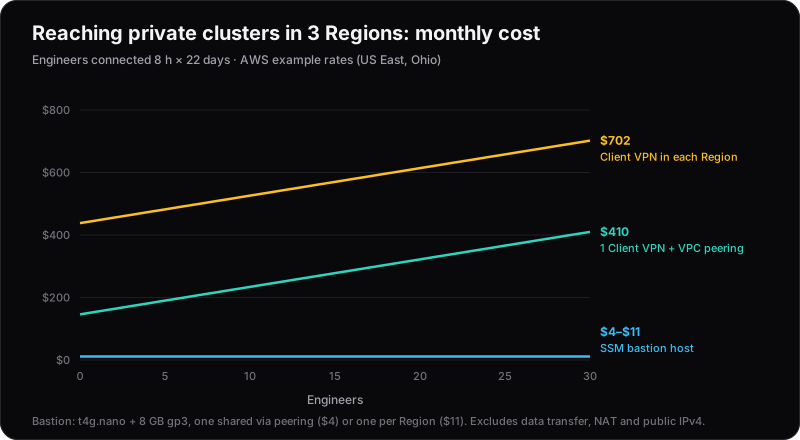
Example rates from the AWS VPN and EC2 pricing pages. Excludes data transfer, NAT gateways and public IPv4 charges.
The instance
data "aws_ami" "al2023" {
  most_recent = true
  owners      = ["amazon"]

  filter {
    name   = "name"
    values = ["al2023-ami-2023.*-arm64"]
  }
}

resource "aws_iam_role" "bastion" {
  name = "eks-bastion"
  assume_role_policy = jsonencode({
    Version = "2012-10-17"
    Statement = [{
      Effect    = "Allow"
      Action    = "sts:AssumeRole"
      Principal = { Service = "ec2.amazonaws.com" }
    }]
  })
}

resource "aws_iam_role_policy_attachment" "ssm" {
  role       = aws_iam_role.bastion.name
  policy_arn = "arn:aws:iam::aws:policy/AmazonSSMManagedInstanceCore"
}

resource "aws_iam_instance_profile" "bastion" {
  name = "eks-bastion"
  role = aws_iam_role.bastion.name
}

resource "aws_security_group" "bastion" {
  name   = "eks-bastion"
  vpc_id = var.vpc_id
  # No ingress rules: the SSM Agent only makes outbound connections.
}

resource "aws_vpc_security_group_egress_rule" "bastion_https" {
  security_group_id = aws_security_group.bastion.id
  cidr_ipv4         = "0.0.0.0/0"
  from_port         = 443
  to_port           = 443
  ip_protocol       = "tcp"
}

resource "aws_instance" "bastion" {
  ami                    = data.aws_ami.al2023.id
  instance_type          = "t4g.nano"
  subnet_id              = var.private_subnet_ids[0]
  vpc_security_group_ids = [aws_security_group.bastion.id]
  iam_instance_profile   = aws_iam_instance_profile.bastion.name

  metadata_options {
    http_tokens = "required"
  }

  tags = {
    Name   = "eks-bastion"
    Access = "platform"
  }
}

resource "aws_vpc_security_group_ingress_rule" "eks_from_bastion" {
  security_group_id            = aws_eks_cluster.this.vpc_config[0].cluster_security_group_id
  referenced_security_group_id = aws_security_group.bastion.id
  from_port                    = 443
  to_port                      = 443
  ip_protocol                  = "tcp"
}
Amazon Linux 2023 ships with the SSM Agent. The instance sits in a private subnet and reaches Systems Manager through the VPC's NAT gateway. Most EKS VPCs already have one for the nodes. If yours doesn't, add interface endpoints for ssm, ssmmessages and ec2messages. They cost about $7 a month each per Availability Zone, which quickly costs more than the instance.
For clusters in peered VPCs in other Regions, replace referenced_security_group_id with cidr_ipv4 = var.hub_vpc_cidr.
Who can connect
Access is plain IAM, so it lives in the Identity Center permission set. This policy only lets engineers open port-forwarding sessions to instances tagged Access = platform:
{
  "Version": "2012-10-17",
  "Statement": [
    {
      "Effect": "Allow",
      "Action": "ssm:StartSession",
      "Resource": "arn:aws:ec2:*:111122223333:instance/*",
      "Condition": {
        "StringEquals": { "ssm:resourceTag/Access": "platform" },
        "BoolIfExists": { "ssm:SessionDocumentAccessCheck": "true" }
      }
    },
    {
      "Effect": "Allow",
      "Action": "ssm:StartSession",
      "Resource": "arn:aws:ssm:*::document/AWS-StartPortForwardingSessionToRemoteHost",
      "Condition": { "BoolIfExists": { "ssm:SessionDocumentAccessCheck": "true" } }
    },
    {
      "Effect": "Allow",
      "Action": ["ssmmessages:OpenDataChannel", "ssm:TerminateSession", "ssm:ResumeSession"],
      "Resource": "arn:aws:ssm:*:*:session/${aws:userid}-*"
    }
  ]
}
Without the ssm:SessionDocumentAccessCheck condition, a start-session call with no --document-name can fall back to the default shell document even if the policy doesn't list it. With the check on every StartSession statement, nobody gets a shell on the bastion. It's only a tunnel. That keeps credentials off a shared machine.
The remote-host document can forward to any host the bastion can reach, not just the EKS endpoint. If that matters, restrict the bastion's security group egress.
Connecting kubectl
Engineers need the AWS CLI and the Session Manager plugin. Open a tunnel to the cluster's private endpoint:
aws ssm start-session \
  --target i-0123456789abcdef0 \
  --document-name AWS-StartPortForwardingSessionToRemoteHost \
  --parameters '{"host":["ABCD1234.gr7.eu-west-1.eks.amazonaws.com"],"portNumber":["443"],"localPortNumber":["8443"]}'
Then point kubectl at the local port. The API server's certificate is issued for the cluster's hostname, not 127.0.0.1, so set tls-server-name to keep certificate checks on:
aws eks update-kubeconfig --name prod --region eu-west-1
kubectl config set-cluster arn:aws:eks:eu-west-1:111122223333:cluster/prod \
  --server=https://127.0.0.1:8443 \
  --tls-server-name=ABCD1234.gr7.eu-west-1.eks.amazonaws.com
It works, but it's one tunnel per cluster, each on its own local port. A small wrapper script makes this bearable.
Client VPN or bastion host?
| Client VPN | Session Manager bastion host | |
|---|---|---|
| Fixed cost | ~$73/month with 1 subnet association, ~$146/month with 2 for AZ redundancy | ~$4/month per instance |
| Usage cost | $0.05 per connected hour (~$9/month per engineer at 8 hours a day) | Nothing |
| Multiple Regions | One endpoint + VPC peering | One instance + VPC peering |
| Client software | AWS VPN Client | AWS CLI + Session Manager plugin |
| Sign-in | SAML through IAM Identity Center | IAM Identity Center (aws sso login) |
| What engineers can reach | Whole CIDRs, per group | One host and port per tunnel |
| Private DNS and internal web UIs | Work as if inside the VPC | Need a tunnel per service |
| Audit trail | Connection logs in CloudWatch | StartSession events in CloudTrail |
| Something to patch | No | One instance (Patch Manager helps) |
Choose the bastion host when engineers mostly need kubectl and the occasional database tunnel. For small teams, it does the same job for a few percent of the cost, even against a single-association Client VPN, and that cost stays flat however much the team grows.
Choose Client VPN when people need the network rather than a few ports: internal dashboards, private DNS names, several databases, or tools that don't work through a local tunnel. Also choose it when you want network access managed by group and easy to show an auditor. For larger teams, that convenience is worth the extra money.
Either way, use one access point and peer the VPCs to it. Don't build one access point per Region.