ECS or EKS? Choosing where to run containers on AWS
A practical comparison of Amazon ECS and EKS for startups and small teams — cost, complexity, and when Kubernetes is actually worth it.
Once your app is in containers, the next question is where to run them on AWS. The two main options are Amazon ECS and Amazon EKS. Both are production-grade. The difference is mostly how much platform you want to own.
The short version
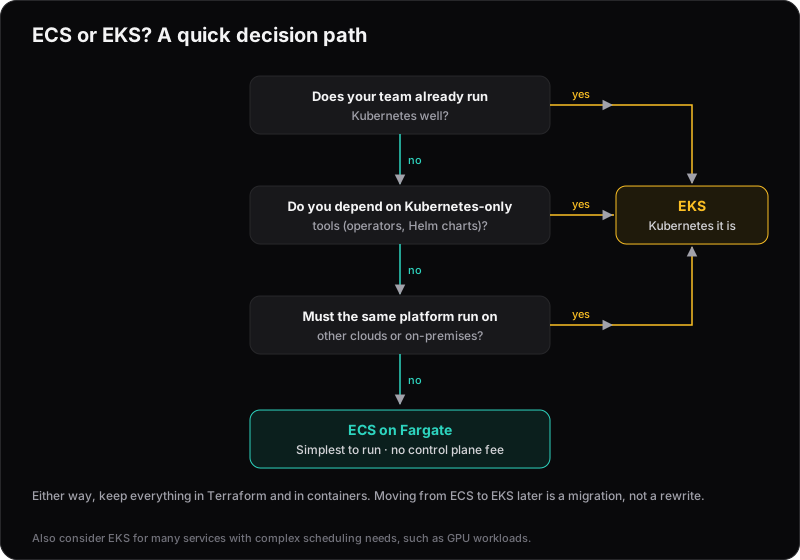
For most startups and small teams, ECS with Fargate is the better starting point. Choose EKS when you have a specific reason to want Kubernetes.
| ECS | EKS | |
|---|---|---|
| Control plane fee | None | $0.10/hour per cluster |
| Concepts to learn | Tasks, services, clusters | All of Kubernetes, plus AWS integration |
| Upgrades | No cluster versions; on Fargate, nothing to patch | Planned cluster and add-on upgrades |
| Ecosystem | AWS-native | Helm, operators, GitOps, service meshes |
| Portability | AWS, plus on-premises via ECS Anywhere | Any Kubernetes, minus AWS-specific integrations |
| Runs on Fargate | Yes | Yes, with limits (no DaemonSets, GPUs, Arm or Spot) |
Amazon ECS
ECS is AWS's own container orchestrator. You define task definitions (your containers) and services (how many copies to run, behind which load balancer), and AWS handles the rest.
- No control plane to manage or pay for.
- Integrates directly with IAM, Application Load Balancers, CloudWatch, Secrets Manager and Service Connect.
- Fewer concepts to learn, so the whole team can understand and operate it.
- With Fargate, there are no servers to patch at all.
The trade-off is that it's tied to AWS (ECS Anywhere can run tasks on your own servers, but the control plane stays in AWS), and it has a smaller ecosystem of third-party tooling than Kubernetes.
Amazon EKS
EKS is managed Kubernetes. AWS runs the control plane; you get the standard Kubernetes API and everything built around it.
- Access to the Kubernetes ecosystem: Helm charts, operators, service meshes, GitOps tools and more.
- Portability: the same manifests can run on other clouds or on-premises, as long as they avoid AWS-specific pieces such as load balancer annotations, IAM integration and EBS storage classes.
- Fine-grained control over scheduling, networking and autoscaling.
The trade-off is complexity. Each cluster has an hourly control plane fee before you run anything, and there are many more moving parts to understand.
The hidden cost of Kubernetes
The control plane fee is small: $0.10 an hour, about $73 a month per cluster. It adds up with one cluster per environment, and it rises sharply if you fall behind on upgrades:
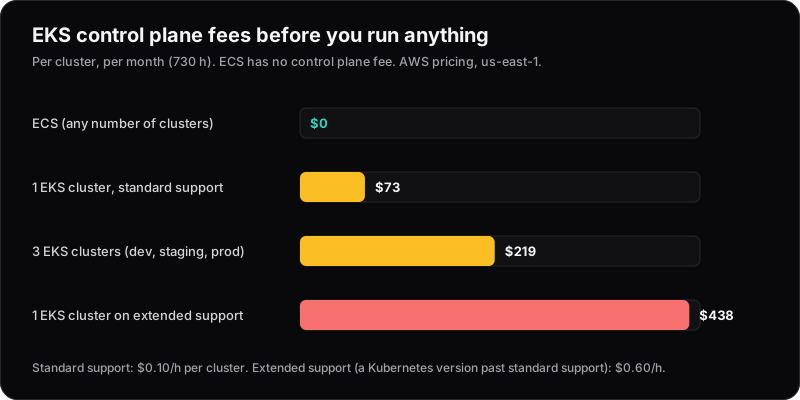
That last bar is the one to watch. Kubernetes releases new minor versions regularly and each is supported for a limited time. A cluster still on an old version after standard support ends moves to extended support, which costs $0.60 an hour, six times the normal fee.
The bigger cost is operations. Clusters need planned upgrades, along with the add-ons that run on them: networking, ingress, DNS, autoscaling, observability.
EKS Auto Mode (since December 2024) takes much of this off your plate. AWS manages the nodes, autoscaling, load balancing, pod networking, DNS and block storage, for a per-instance management fee on top of the EC2 price. You still plan Kubernetes version upgrades and run your own observability.
For a team of a few engineers, that's time not spent on the product.
When EKS is the right call
- Your team already knows Kubernetes well.
- You depend on Kubernetes-native tools, such as specific operators or Helm charts.
- You have a genuine requirement to run the same platform across clouds or on-premises.
- You run many services with complex scheduling needs, such as GPU workloads or advanced autoscaling.
Fargate or EC2?
Both ECS and EKS can run on Fargate (serverless: pay per task or pod, no nodes) or on EC2 instances you manage. On EKS, Fargate has limits: no DaemonSets, GPUs, Arm or Fargate Spot.
Fargate is simpler and is usually the right default. EC2 becomes cheaper for large, steady workloads where you can keep instances busy, or when you need specific instance types such as GPUs.
Update (October 2026): Since 30 September 2025, ECS Managed Instances sits in between: AWS provisions, patches and scales the EC2 instances for you, for a per-instance management fee on top of the EC2 price.
Our default
For most teams we work with:
- Production-ready Dockerfiles — small images, non-root users, health checks.
- ECS on Fargate, fully defined in Terraform.
- A CI/CD pipeline that builds, pushes and deploys on every merge.
Because your apps are containerised, moving to EKS later is a well-understood migration — not a rewrite. Start simple, and add Kubernetes when a real need shows up.