A real AWS test account vs MiniStack, Floci and LocalStack
Local AWS emulators are fast and free, but they aren't AWS. How a separate test account compares with MiniStack, Floci and LocalStack, and how to use both.
Testing code that talks to AWS has always meant choosing between two imperfect options: run against real AWS, which is accurate but slow and costs money, or run against a local emulator, which is fast and free but only approximates AWS.
That choice changed this spring. On 23 March 2026 LocalStack ended its free Community edition: the latest image now needs an account and auth token, and the free Hobby plan is for non-commercial use only. Free, MIT-licensed alternatives such as Floci and MiniStack are worth a look. So it's a good time to look at the options again.
The options
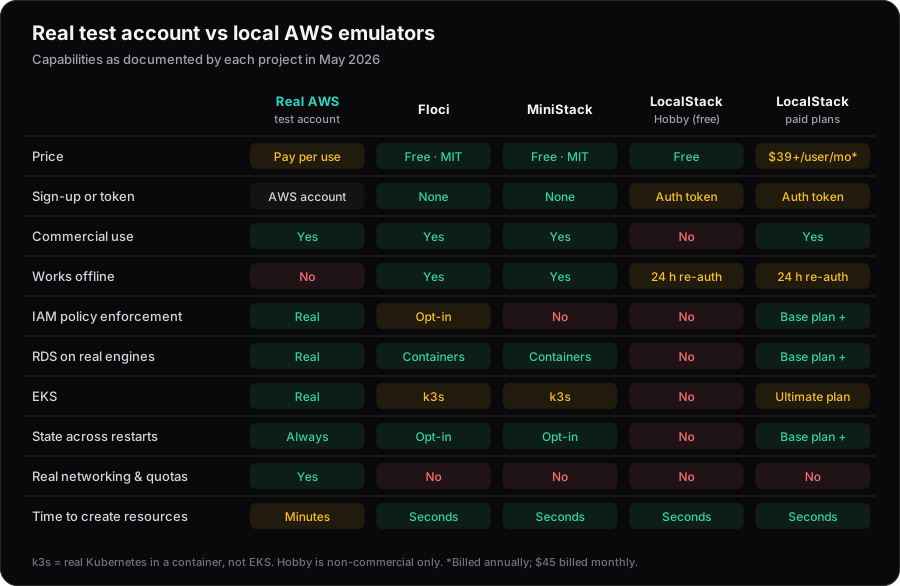
Based on each project's own documentation in May 2026. Emulator capabilities change quickly, so check before you choose.
- Floci (Java) is free with no account or token. It runs heavier services such as RDS, ECS and EKS (as k3s) in real Docker containers. Most services accept any credentials, and IAM enforcement is opt-in.
- MiniStack (Python) is free with no account either. It claims 40+ services, runs real Postgres and MySQL for RDS and EKS as k3s, and can persist state with
PERSIST_STATE=1. It doesn't enforce IAM policies. - LocalStack remains the most established option, but RDS, ECS, IAM enforcement and persistence need a paid plan (from $39 per user per month, billed annually), and EKS needs the Ultimate plan.
Update (October 2026): MiniStack now claims 60+ services, and v1.5.0 (August 2026) added opt-in IAM enforcement with AUTH=true.
All three listen on port 4566, so switching between them is mostly a matter of changing the image.
What emulators are good at
Emulators shine in the inner loop: a developer running integration tests on a laptop, or CI running them on every pull request. They start in seconds, cost nothing, work offline and can be reset between tests. Recent AWS SDKs read AWS_ENDPOINT_URL, so pointing your code at an emulator is one environment variable:
# GitHub Actions: integration tests against Floci
services:
  aws:
    image: floci/floci:latest
    ports: ["4566:4566"]
env:
  AWS_ENDPOINT_URL: http://localhost:4566
  AWS_ACCESS_KEY_ID: test
  AWS_SECRET_ACCESS_KEY: test
  AWS_REGION: eu-west-1
Where emulators fall short
Emulators re-implement AWS APIs, so the bugs they can't catch are the ones you most want to find before production:
- IAM. Missing permissions are the most common reason a change that "works locally" fails in AWS. Most emulators accept any credentials unless you turn enforcement on, and even then policy evaluation is a re-implementation.
- Networking. Security groups, VPC endpoints, NAT and DNS don't exist in a meaningful way.
- Quotas, throttling and timing. Service limits, eventual consistency and how long resources take to become ready are exactly what emulators skip.
- Managed behaviour. An EKS emulated with k3s is real Kubernetes, but it isn't EKS: you connect with the k3s kubeconfig rather than IAM, and node groups, where emulated, are API records rather than EC2 capacity.
Why a separate test account
A dedicated test account gives you real AWS behaviour without risking anything that matters. A few rules keep it cheap and tidy:
- Create it under AWS Organizations, separate from dev, staging and prod. Nothing in it should be precious.
- Set a budget with alerts, and use service control policies to block expensive instance types and unused Regions.
- Make stacks short-lived. CI creates a stack per run, tests it, and destroys it.
- Clean up nightly anyway. Failed runs leave things behind. Gruntwork's cloud-nuke deletes everything in an account that's older than a set age (see below).
- Tag everything with the pull request or pipeline run that created it, so leftovers are easy to trace.
Nightly clean-up with cloud-nuke
cloud-nuke is built for exactly this, and it's highly destructive: by default it deletes every supported resource type, including IAM roles. Only ever point it at the test account.
Protect the things that must survive (the CI role, the Terraform state bucket, the budget alarm) by tagging them cloud-nuke-excluded = true (this works for resource types that support tag filtering; check cloud-nuke's support matrix). Anything else older than a day goes:
# Preview first
cloud-nuke aws --older-than 24h --config nuke.yaml --dry-run

# Then, from a scheduled CI job in the test account
cloud-nuke aws --older-than 24h --config nuke.yaml --force
The --config file adds name-based exclusions for resources you can't tag:
# nuke.yaml
IAMRoles:
  exclude:
    names_regex:
      - ^ci-test-runner$
      - ^OrganizationAccountAccessRole$
Run the dry run by hand first, and read the list. It's the quickest way to find out what your tests have been leaving behind.
Short-lived stacks change the cost picture. A c7g.large costs about $53 a month in us-east-1 if it's always on, but a few cents for a test run that lasts an hour.
Use both
The answer isn't one or the other. Each kind of test belongs where it's fastest without hiding real problems:
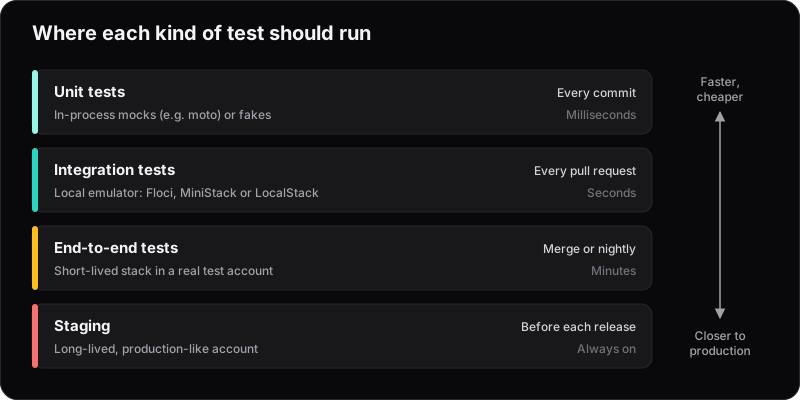
- Every pull request: integration tests against Floci or MiniStack. Fast, free and good at catching logic errors.
- On merge or nightly: deploy a short-lived stack into the real test account and run end-to-end tests. This catches IAM, networking and timing problems.
- Before release: staging, which should look like production.
If your team relied on LocalStack's free Community edition for commercial work, you'll have to pick something anyway: the Hobby plan doesn't allow it. Our suggestion: try Floci or MiniStack for the fast layer, run your existing tests against both, and keep whichever passes more of them. Then add a real test account for the layer no emulator can replace.